Adjust Motion Sensor Sensitivity
Overview
Motion sensors have a 90º field of view and detect motion up to 45 feet away. They detect movement across a room or hallway and should be used to secure high traffic areas.
To preserve battery life, Motion sensors will become inactive for 3 being triggered and during that time will not trigger again.
By default, and under proper circumstances, Motion Sensors will not detect a body under 30 lbs
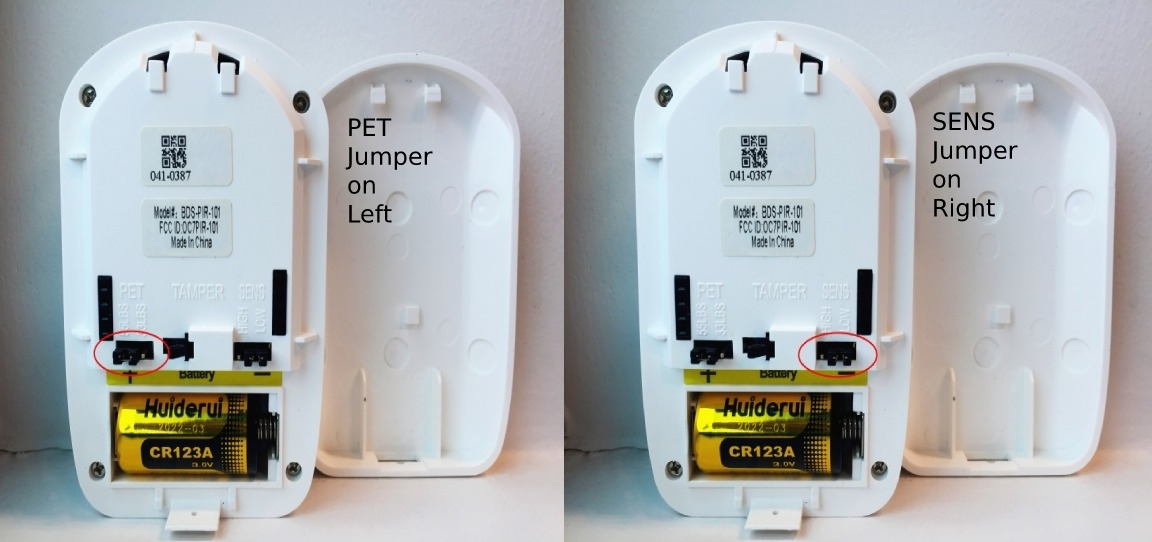
Adjusting Settings for Pets
To change the setting:
- Open the back of the Motion sensor.
- Remove the PET pin covering the 55 lbs jumper.
-
Place the PET pin on the 33 lbs jumper.
Understanding Your Motion Sensors Sensitivity
By default, Motion Sensors are set to a HIGH sensitivity, so it will be triggered more easily than if set to LOW sensitivity.
To change this setting:
- Open the back of the Motion Sensor.
- Remove the SENS pin covering the HIGH jumper.
-
Place the SENS pin on the LOW jumper.
Important!
Keep in mind, a 10 lb cat 40 feet away from the sensor will not set off the sensor, however, that same cat 10 feet from the sensor will cause the sensor to go off.